

What Anyza Club is
Online communities with a feed, chat, courses, events, videos, files and subscriptions. Joining is free; the owner uses a few credits a day.
Watch the lesson
Anyza Club (anyza.club) is where communities live: a group around a topic, with a feed of posts, chat rooms, courses and lessons, events (in person, online and live), videos, files and, if the owner wants, a paid subscription. All with your Anyza account, the same one you use on Market and Events.
Community tabs
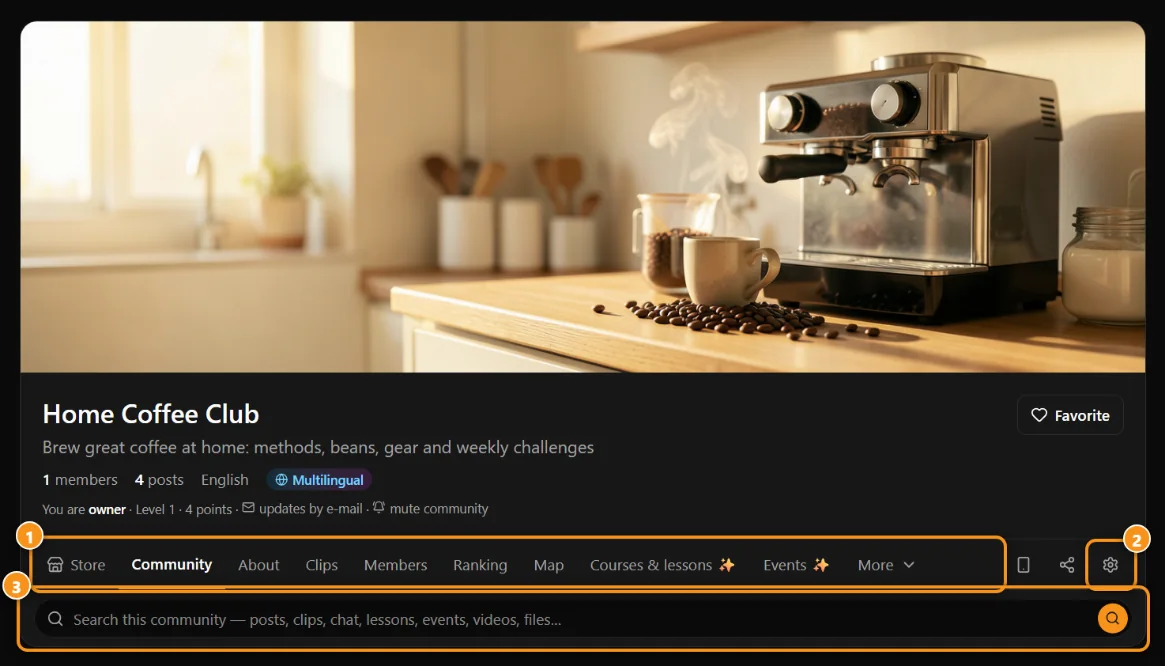
1 the tabs · 2 Settings (team only) · 3 search everything in the community
Each community has a row of tabs. The ones that don't fit on screen go under More. Some only show when they have content (the team always sees all of them, to add things).
- Store: the owner's Market listings and members-only items.
- Community: the feed, with posts by topic.
- About: the introduction, rules, gallery and welcome video.
- Clips: short vertical videos, one per screen. See Clips.
- Members and Ranking: who's in and who has the most points.
- Map: members by city, when the owner turns it on. See Community app, map, groups and widgets.
- Courses & lessons: courses with modules, lessons, quizzes and certificates. See Courses and lessons.
- Events: the agenda, with live streams and in-person events. See Events, lives and tickets.
- Videos: the community's video library. See Video library.
- Chat: live chat rooms.
- Files: documents, images and links organized in folders. See Files library.
- Groups: the community's Telegram and Discord channels and groups.
- Giveaways: open and recent giveaways. See Giveaways.
Next to the tabs are the App icon (install the community on your home screen), Share (send the link to someone) and, for the team, Settings. Right below, the search looks through posts, clips, chat, lessons, events, videos and files.
Members, Ranking, Map, Clips, Videos, Chat and Files are for members only. In a public community, people who haven't joined see Community, About, Events, courses with a public page and, when there are any, Store, Groups and Giveaways.
For members
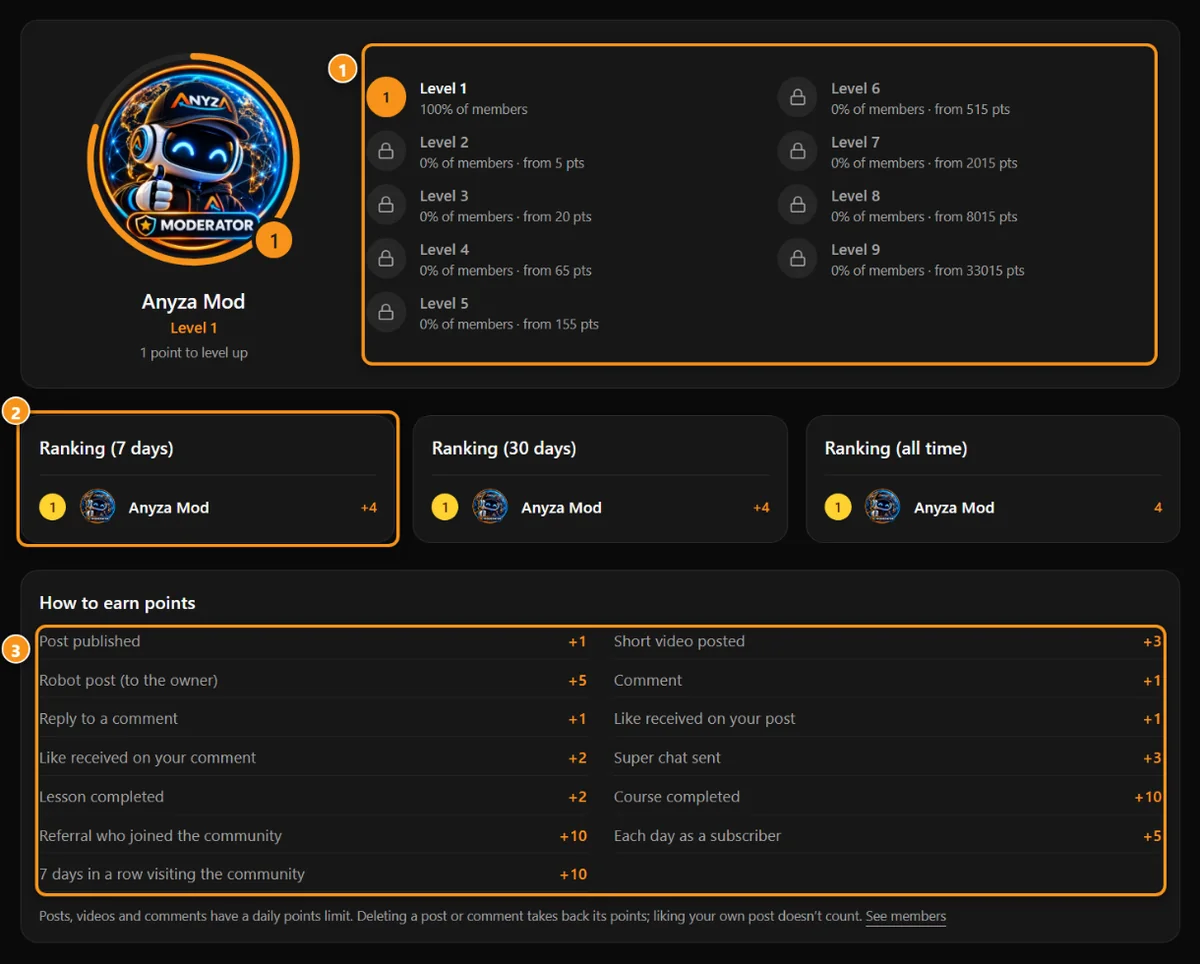
1 the 9 levels · 2 rankings for 7 days, 30 days and all time · 3 how to earn points
- Joining: you join a public community with one click; in a private one you ask and the team approves; you can also join with an invite. See Joining a community, invites and Share.
- Points and levels: you earn points by taking part: posts, short videos, comments, replies, likes received, super chats, completed lessons and courses, referrals who joined, each day as a subscriber and 7 days in a row of visits. Points raise your level, from 1 to 9. The How to earn points table is on the Ranking tab.
- Direct messages: you can chat one to one with other members using the Message button.
- On your phone: install the community as an app and get notifications. See Community app, map, groups and widgets.
- In other languages: if the community turned on auto-translation, you see everything in your language. See Automatic translation.
Joining a community is always free. Subscription plans are optional and unlock extra content. See Subscriptions.
For creators
- Any account with a confirmed email can create up to 10 communities.
- Each community uses the owner's credits: public 1 a day, private 2, plus a few optional extras (subscriber-only content, auto-translation, files beyond the included space, videos, robot posts, email messages and summaries). Every account starts with 1,000 welcome credits. Members pay nothing. See Credit usage.
- The owner gets subscription payments directly: in crypto to their own wallet, through Anyza Pay, or by card through their own payment link (for example, Whop). Anyza never holds anyone's money. See Owner payouts.
- To get started, see Create and set up a community.
What else you can do
- Invite only: topics, rooms, events, videos and folders for chosen members only.
- Certificates and public course pages: completion certificates and a public page for each course.
- Giveaways, Clips and Video library.
- Telegram, Discord and WhatsApp: the Anyza bot posts your news and runs the members-only group.
- Widgets: your community, courses and events on your website.
House rules
New communities get a quick look from Anyza moderation; most of the time they go live right away. Prohibited content follows Anyza's rules. To report something, use the Report button on the post, comment, member or community. Reports go to the community team first; platform cases go to Anyza moderation.
Updated 2026-10-15