

Subscriptions: plans, crypto, and Whop
Up to 3 plans per community. Payment goes straight to the owner, Anyza stays out of it.
Watch the lesson
What it is
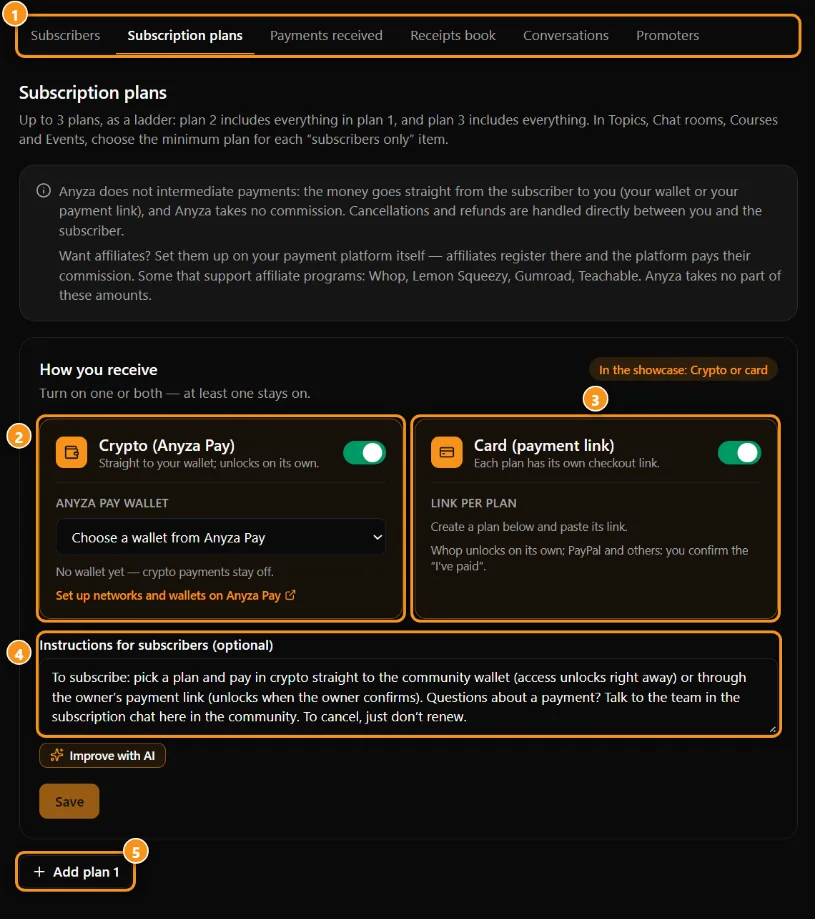
1 the Subscribers tabs · 2 crypto (Anyza Pay) · 3 card (payment link) · 4 instructions for subscribers · 5 add a plan
The owner can offer up to 3 subscription plans (for example Basic, VIP, Black), each with its own price, duration, and what it unlocks: topics, rooms, courses, and events "members only", discounts on paid events.
How to subscribe
- Click Subscribe in the community and pick your plan.
- Choose how to pay:
- Crypto on Solana (USDC or USDT), through Anyza Pay: you get a QR code and the exact amount. Once you pay, Anyza Pay checks the network and it unlocks on its own.
- Card / owner's link (for example Whop or PayPal): you pay there with the same email as your Anyza account and come back — with Whop connected, it unlocks on its own; with another link, click Already paid and the owner confirms.
The community card shows which ways it accepts: Crypto or card, Crypto only or Card only. 3. Before you pay you accept the refund policy.
Expiration and renewal
Your subscription lasts for the plan's duration. You get reminders 7 days, 3 days, and on the day it expires. Renewing early adds the days. Your payment history is in My subscription, in the community.
Money and refunds
Payment goes straight to the owner's wallet or bank account. Anyza doesn't charge a fee, doesn't hold funds, and doesn't process refunds — refunds are arranged with the owner, who can process the return from their own wallet.
Updated 2026-10-15