

Courses and lessons
Lessons in order, modules released over days, free sample lessons, videos and files in each student's language.
Watch the lesson
In the Courses & lessons tab, the owner organizes content into courses → modules → lessons.
How it works for students
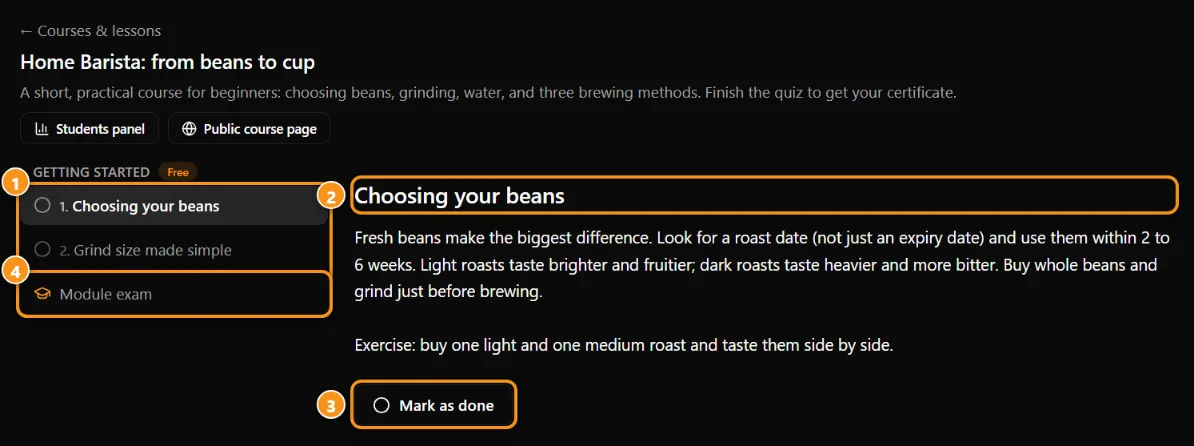
1 the lessons of the module · 2 the lesson you are on · 3 Mark as complete · 4 the module quiz
- Lessons have video, text, attachments and comments. Tap Mark as done and track your % of the course.
- A course can be for all members or subscribers only. Locked lessons show a padlock; some are free samples.
- Modules can open after X days counted from when you joined (or subscribed). The date shows on the lesson.
- A live lesson has its own chat during the stream.
For teachers
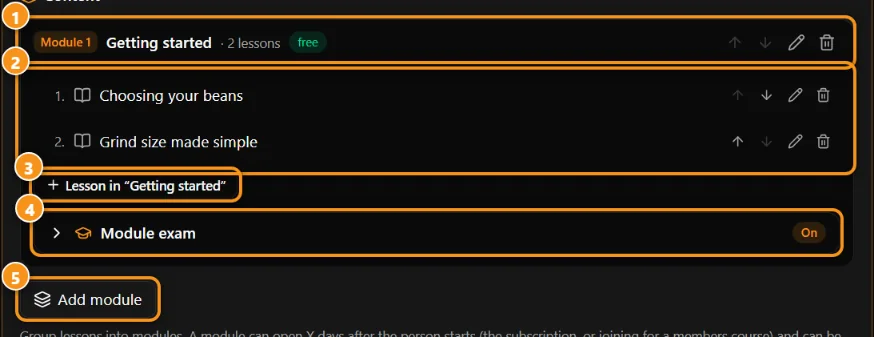
1 the module · 2 its lessons · 3 add a lesson · 4 module quiz · 5 add a module
In Settings → Courses & lessons: create courses, modules and lessons, add attachments (private files, only for people with access), schedule publishing, turn comments on or off.
Lessons in several languages
Teaching an international audience? Each student can get the lesson in their own language (the language they chose on the site):
- Video in other languages: add a YouTube link for each language. Without one, the main video plays (with YouTube subtitles, when the video has them).
- Library video in other languages: the same for videos from your community's video library. The order a student sees is: library video in their language → YouTube link in their language → main library video → main YouTube link.
- Files by language: mark the language of each attachment. Students see the files in their language plus the ones marked All languages. A lesson takes up to 30 attachments.
- Text: with automatic translation on, the course, module and lesson texts are translated for each student (see Automatic translation).
The community cover can also change by language, in Settings → About → Cover in other languages.
Updated 2026-10-15