

Team: co-organizers, finance, door and resolution
Add people to your organizer by @username with a role, how invites work, what each role can do and door staff without an account.
Watch the lesson
An organizer can have a team. Everyone on it works on all the organizer's events, with the permissions of their role.
Add someone
In the organizer Settings, under Team:
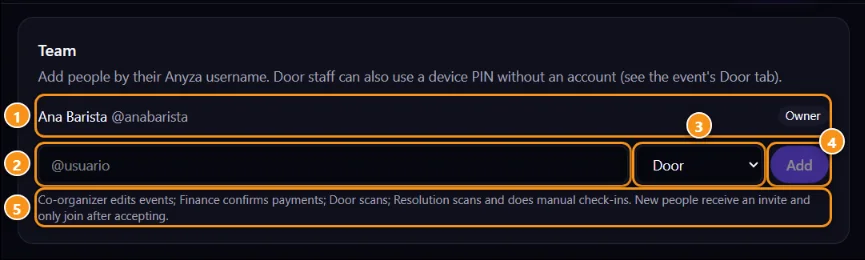
1 Team member and role · 2 @username · 3 Role · 4 Add · 5 What each role does
- Type the person's Anyza
@username2. - Pick the role 3.
- Tap Add 4.
The person gets an invite and joins only after accepting it in Team invites. They can leave later from the organizer's settings.
Roles
- Co-organizer: edits events and runs everything, except how the money arrives.
- Finance: confirms payments, refunds and cancels orders in Sales.
- Door: scans tickets at the entrance from their own phone. See The door.
- Resolution: scans and does manual check-ins, for the help desk next to the lanes.
The owner 1 is the only one who changes the wallet and payment link, hands over or deletes the organizer.
Door staff without an account
People who only work the door don't need an account: create a device with PIN in the event's Door tab and send them the link.
Related: Organizer profile, trust tier and payouts · Sales and payment confirmation · The door: check-in by QR
Updated 2026-10-16