

Favorites, alerts and map
Heart an event to know when sales open, save a search for new events, and find in-person events on the map.
Watch the lesson
Search and alerts
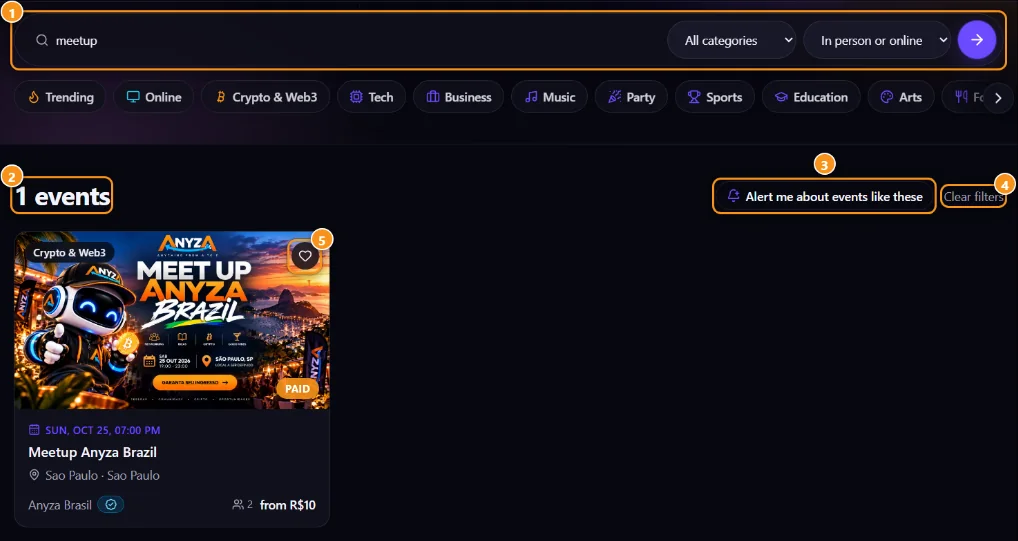
1 Search, category and format · 2 Results · 3 Alert me about events like these · 4 Clear filters · 5 Favorite
Filter the showcase 1 (text, category, type, country, city, language, near me) and click Alert me about events like these 3. When a new event matches, you'll get notified in the bell and by email. Manage them in Search alerts, where you can Pause, Resume or Delete each one. Up to 20. Alerts run every hour, and only events published after you saved the search count.
Favorites
The heart 5 on the card or event page saves it to Favorites. If you don't have a ticket yet, you'll get a notice when sales open and when tickets are running out.
Preferences
In Preferences you can tick Show only events in [your language] and set a Default place (country, state and city) to see only events in your country or city. Online and hybrid events are included. A filter you pick by hand always wins. The Events near me button uses your browser's location.
Map
Map, in the top menu, shows upcoming in-person events. Zoom in on your city or tap Near me. Nearby events are grouped; tap a pin to see the cover, date and place, then See event. The list next to the map shows what's in the area on screen.
City and theme pages
You can also browse events by city or theme, for example anyza.events/explore-events or anyza.events/crypto-events. See Share and promote an event.
Updated 2026-10-16