

Event groups on Telegram and Discord
Connect a Telegram group or channel, or a Discord server, to the official Anyza bot: automatic updates about the event and a group only ticket holders can join.
Watch the lesson
In the event's Groups tab, the owner and co-organizers connect a Telegram group or channel, or a Discord server, to the official Anyza bot (@anyzanetbot on Telegram and the Anyza app on Discord). Up to 5 per event. It costs no credits.
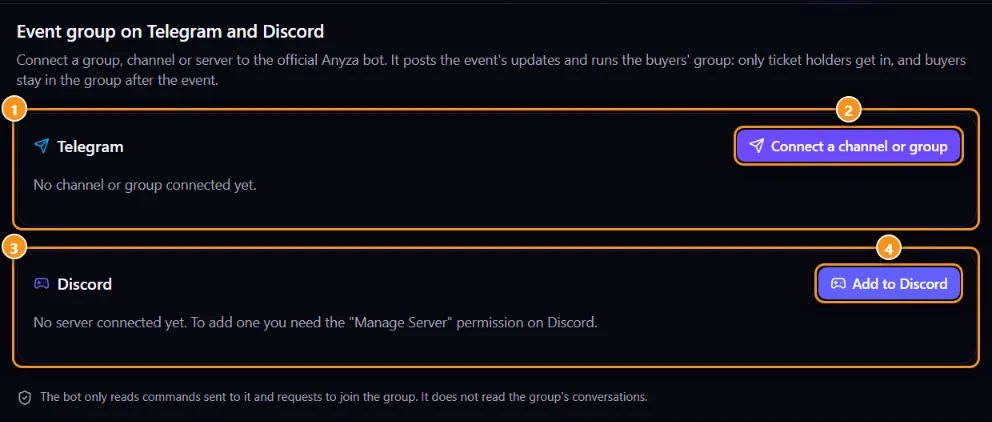
1 Telegram · 2 Connect channel or group · 3 Discord · 4 Add to Discord
What the bot does
- Automatic updates: the bot posts in the event's language when the event is published, when a new batch goes on sale, when the last tickets are left and the day before ("it's tomorrow").
- Buyers' group: only ticket holders (and the team) get in, through Join the Telegram group or Join the Discord server on the event page and on the ticket. A forwarded invite link doesn't work for anyone else.
- Buyers stay after the event and leave only if their ticket is cancelled, refunded or transferred.
The bot only reads commands sent to it and requests to join the group. It doesn't read the group's conversations.
Telegram
- Tap Connect a channel or group 2.
- Group: tap Add to group, pick the group and confirm the permissions. The bot connects by itself.
- Channel: tap Add to channel, make the bot a channel admin, then post the code shown in the channel (valid for 30 minutes; the bot deletes the message).
- Tap I've connected it — refresh, then choose the Automatic updates and turn on the Buyers' group if you want. Send a test checks that the bot can post.
Turn off the group's public invite link so nobody gets in another way.
Discord
- Tap Add to Discord 4. You need the "Manage Server" permission on that server.
- Back on Anyza, pick the Updates channel and the Role given to members, then save.
- Make the event's channels visible only to that role. The Anyza bot's role must be above it (on Discord: Server Settings → Roles, drag "Anyza" up).
Related: My tickets · Create an event and tickets · Telegram, Discord and WhatsApp in your community
Updated 2026-10-16