

Swap Market (trades)
List what you would accept in exchange for your item, find who would take what you have, and propose a trade in the chat — with a cash difference if needed. Free.
Watch the lesson
The Swap Market is for people who would rather trade than sell. A listing that accepts trades can show what the seller would take in exchange, and anyone can type what they have to find who would take it. It is free, and the deal stays between the two people, as with any sale on Anyza Market.
List what you would accept
When you post a product for sale, tick I accept trades on the price step. The box What would you accept in trade? appears.
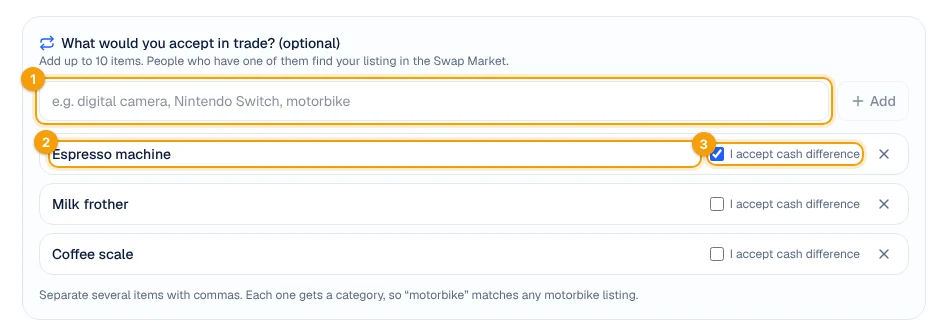
1 Add items · 2 An item on the list · 3 Cash difference
- Type an item and tap Add 1. Add several at once by separating them with commas. Up to 10 items.
- Each item 2 gets a category, so a generic word works: "motorbike" matches any motorbike listing, "console" matches any console.
- Tick I accept cash difference 3 when the values may not match and one side can pay the rest.
- Remove an item with the ×. Untick I accept trades and the list is cleared.
The list is public on your listing and goes through moderation with the rest of the text. You can change it at any time by editing the listing.
On the listing page
Listings that accept trades show Accepts in trade with each item.
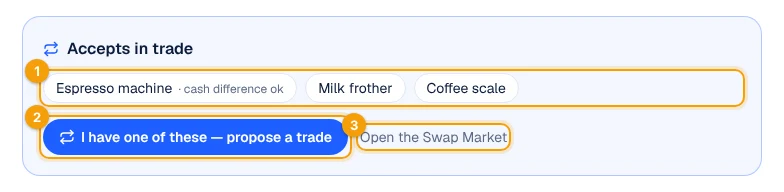
1 What the seller accepts · 2 Propose a trade · 3 Open the Swap Market
- The items 1 show "cash difference ok" when the seller accepts a difference in money.
- I have one of these — propose a trade 2 lets you offer one of your own live listings.
- Open the Swap Market 3 takes you to the full page.
If it is your listing, the button is See matches in the Swap Market: it opens the market with your listing already chosen.
Propose a trade
Tap I have one of these — propose a trade and choose which of your listings you offer.
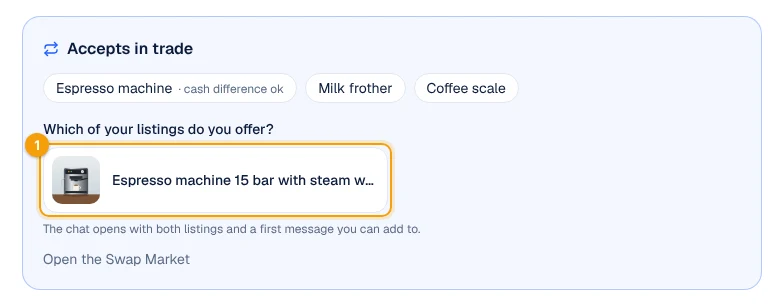
1 One of your live listings
The chat opens with both listings and a first message, which you can complete.
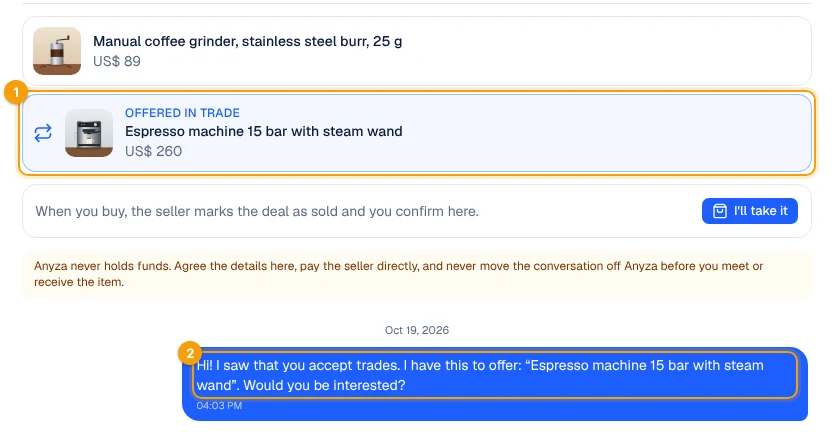
1 The listing offered in trade · 2 The first message
Both listings stay at the top of the conversation, so either of you can open them while you talk. To propose a trade you need a live listing of your own; if you have none, post what you have first.
Find who would take what you have
Open the Swap Market from the category bar (last item), from the Accepts trade filter in the search, or at anyza.market's swap page in your language.
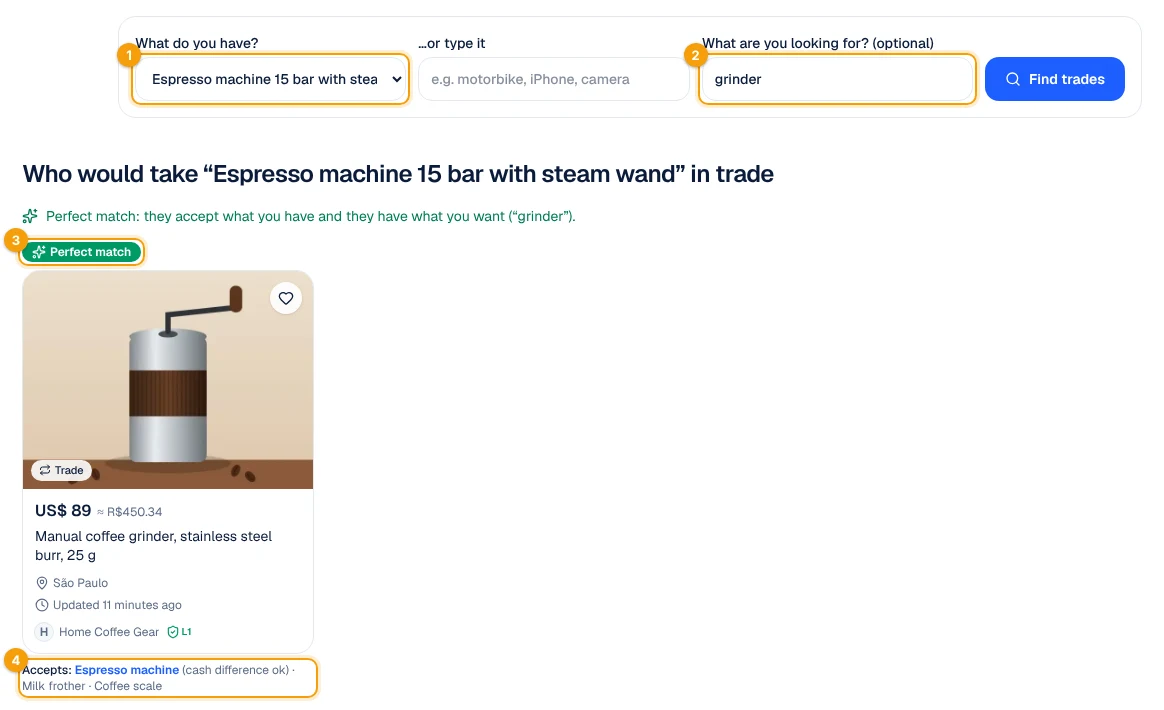
1 What you have · 2 What you are looking for · 3 Perfect match · 4 What that seller accepts
- What do you have? 1: choose one of your listings, or type it ("motorbike", "iPhone").
- What are you looking for? 2 is optional. With it, listings that also have what you want come first, marked Perfect match 3.
- Under each listing you see everything that seller accepts 4; the item that matched yours is highlighted.
Without filling anything in, the page lists every listing in your region that accepts trades.
Notifications
Once an hour, Anyza looks for new matches. You get a Possible trade notification (and an e-mail, if e-mails are on) when:
- someone posts a listing that accepts in trade something you have on sale;
- someone posts something that is on your own list of what you accept.
You get at most one notice per listing and five per day. Turn the e-mail off in My account → E-mails (Possible trades (Swap Market)).
Closing a trade
Agree on everything in the chat: the items, the condition, any cash difference and where to meet. Then:
- The owner of the listing taps Traded with … in the chat.
- The person who offered the trade taps Confirm the trade.
- When the item arrives, tap I received the item and you can review each other (Trading: questions, chat and handshake).
The listing then shows Traded with the other person and what came in exchange for it, and the trade counts on both profiles (Trades, next to completed sales). The listing you offered stays live: if it went in the trade, mark it as sold in My listings.
Tips
- Meet in a public place and check the item and its papers before handing yours over. For vehicles, check the registration documents.
- A cash difference is paid like any Anyza payment: directly from one person to the other, in crypto. Anyza does not hold items or money.
- Be specific when it matters ("iPhone 13 or newer") and generic when you are flexible ("console").
Related: Post a listing · Before you trade: how to make a good deal
Updated 2026-10-20