

Trading: questions, chat and handshake
Ask in public, negotiate in a private chat, and close the deal with a handshake that both sides confirm. The money goes straight between you.
Watch the lesson
Every step below happens on Anyza except the payment itself, which goes wallet to wallet. To ask, message or close a deal you need a confirmed account (level L1 or higher).
Ask a public question
On the listing page, under Questions & answers, write your question and tap Ask.
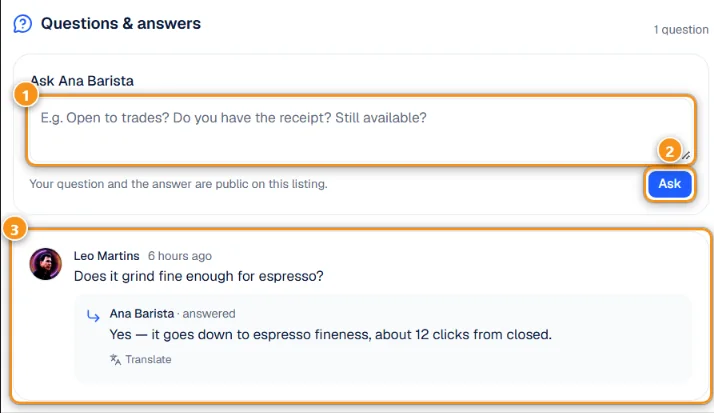
1 Your question · 2 Ask · 3 A question with the seller's answer
Questions have 5 to 500 characters 1. After you tap Ask 2, the question and the seller's answer 3 are public on the listing, which helps the next buyer. Translate shows the answer in your language. You can have up to 3 unanswered questions on the same listing; wait for the seller to answer before asking more.
Sellers see the questions in Messages → Questions and answer publicly. A seller can hide a question or Hide and block user.
Message the seller
Message seller opens a private chat tied to that listing. Agree there on the price, the coin and the network (the fee changes a lot between networks), and how the item is handed over. All your chats are in Messages (the speech-bubble icon at the top), tab Chats.
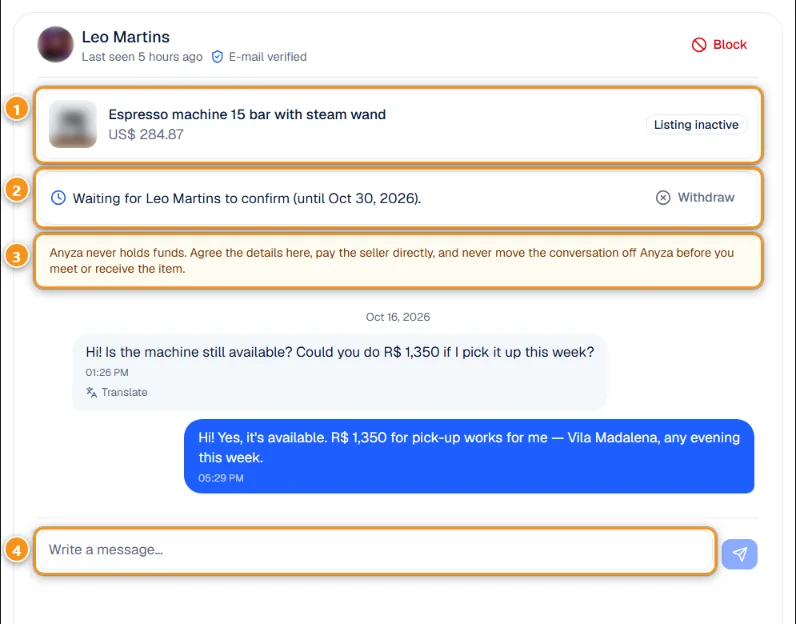
1 The listing · 2 Deal status · 3 Anyza never holds money · 4 Write a message
Each chat shows the listing it belongs to 1 and, once the deal starts, its status 2. The yellow reminder 3 is always there: pay the seller directly, and don't move the conversation off Anyza before you meet or receive the item. Type in the box 4; Translate under a message shows it in your language.
Some listings have limits:
- Followers only: follow the store first, then send your message.
- Exclusive to a community: only members of that Anyza Club community can negotiate. Use Join the community.
If you have a coupon, apply it on the listing before you message: the chat opens with the discounted price. See Discount coupons.
Close the deal (handshake)
- When you want to buy, you can tap I'll take it in the chat to let the seller know.
- The seller taps Sold to <name> in the chat (or Sold to this buyer in Deals). If the listing has variations, the seller picks which one was sold. The listing shows as reserved. Until you answer, the seller sees Awaiting <name> to confirm (until <date>) and can Undo.
- You, the buyer, see the request in the chat:
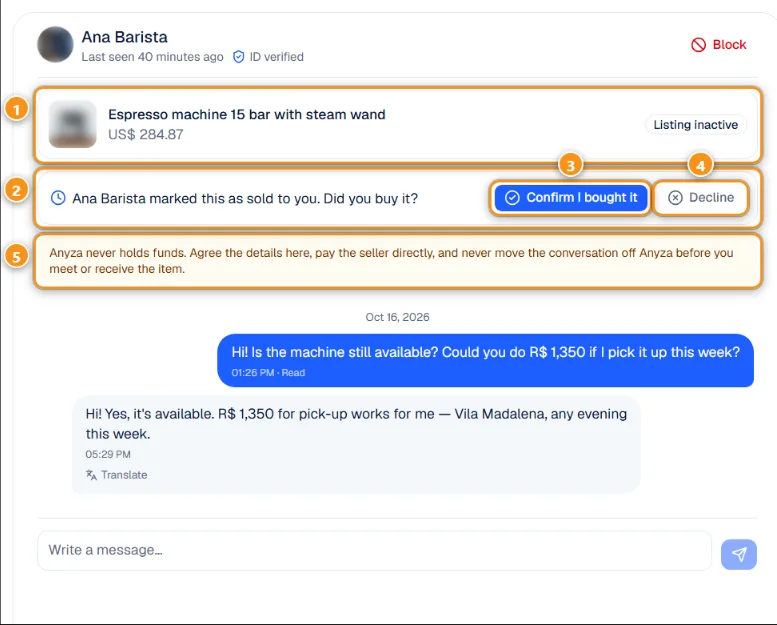
1 The listing · 2 The seller marked it as sold to you · 3 Confirm I bought it · 4 Decline · 5 Anyza never holds money
Tap Confirm I bought it 3 if you are buying, or Decline 4 if not. You have 14 days; after that the handshake expires and the listing is available again.
- You pay the seller directly, wallet to wallet, as agreed. Anyza doesn't receive, hold or return money.
- When the item is in your hands, tap I received the item. That closes the deal, and you can review each other. See Deal closed, receipt and reviews.
Deals
Deals (account menu) lists every negotiation, so you can act without opening each chat.
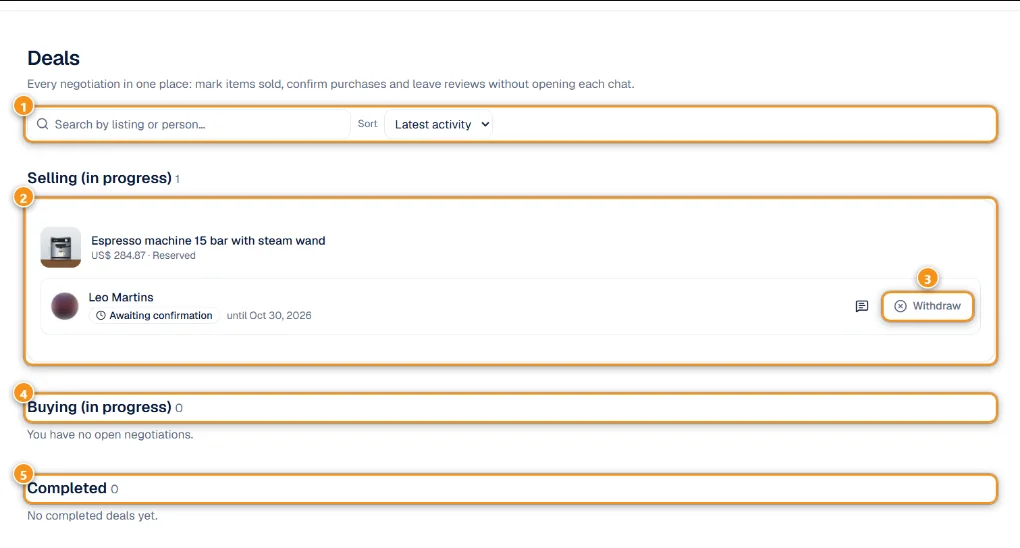
1 Search and sort · 2 Selling (in progress) · 3 Withdraw · 4 Buying (in progress) · 5 Completed
Search by listing or person and sort 1. Under Selling (in progress) 2 the seller sees each buyer and the status, for example Awaiting confirmation with the deadline. Withdraw 3 cancels the handshake. Buying (in progress) 4 and Completed 5 come below.
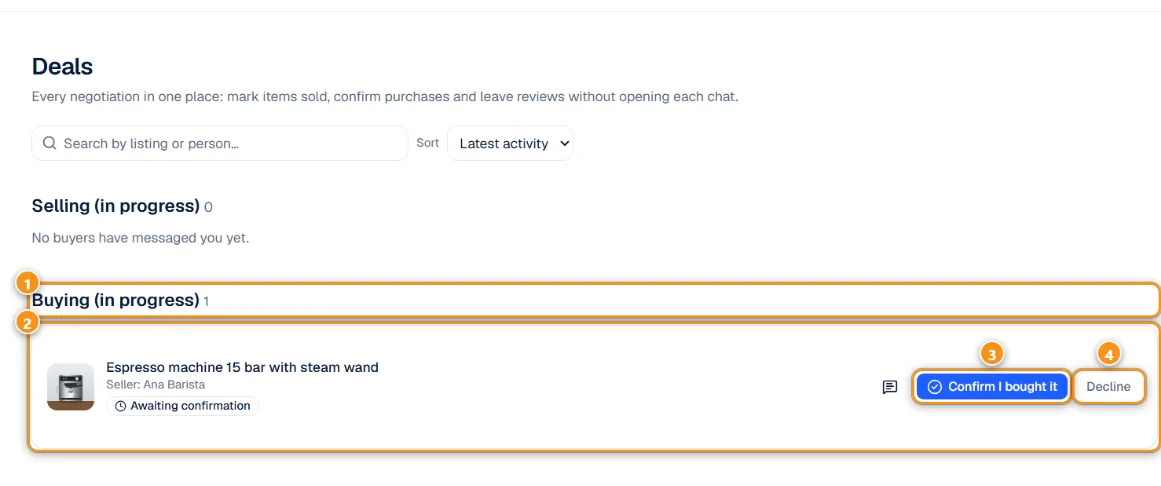
1 Buying (in progress) · 2 The deal · 3 Confirm I bought it · 4 Decline
As a buyer, the same page shows what is waiting for you 1 2, with Confirm I bought it 3 and Decline 4 right there.
Block and report
- In a chat, Block stops messages both ways. Blocked people also can't ask on your listings. You can unblock them in your Market settings.
- Report this listing, Report profile and Report message send the case to Anyza moderation. Reasons: scam or fraud, harassment, spam, prohibited item, other. Anyza never reveals who reported.
Creator milestone
If the seller joined Anyza through someone's invite link, their 3rd confirmed sale to different buyers counts as a creator milestone and earns credits for both of them. See Creator referral.
Tips
- Keep the whole conversation in the Anyza chat. It is your record if something goes wrong.
- Never pay before seeing the item, or before the service is agreed in writing in the chat.
Related: Before you trade: how to make a good deal · Deal closed, receipt and reviews
Updated 2026-10-17