

Before you trade: how to make a good deal
Crypto payments can't be reversed. How to check a seller, scam signals, what Anyza does, and what only you can do.
Watch the lesson
Crypto payments have no chargeback. That makes buying fast and cheap, and it means you need to pay attention. Anyza has no escrow and no buyer protection: the money goes straight from you to the seller.
Check the seller
Every listing has a box about the seller on the side.
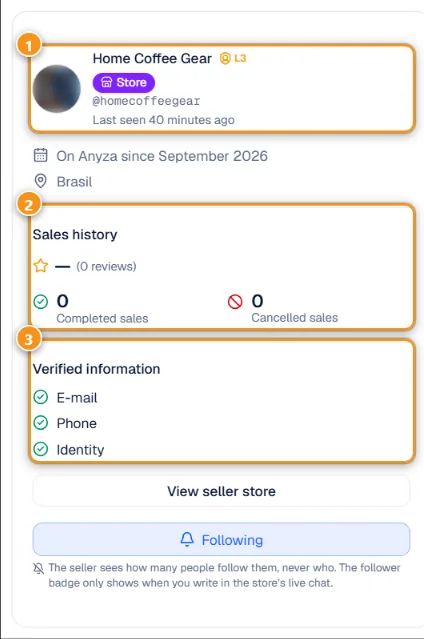
1 Name, level and last seen · 2 Sales history · 3 Verified information
- The name, verification level and when they were last online 1. A Store badge means a Business account, which requires an ID check.
- Sales history 2: average rating, number of reviews, completed and cancelled sales. These only come from deals confirmed by both sides.
- Verified information 3: e-mail, phone (L2) and ID document checked by a moderator (L3).
- How long they have been on Anyza, and the button to see their store and all their reviews.
Before you pay
- See the item. Ask for more photos or a video call showing it. For a service, get what you agreed in writing in the chat.
- Meet in a public place when you can, and pay after checking the item. The Accept crypto nearby box in search and Anyza Radar show places that accept crypto, which make good meeting spots.
- Check the wallet address character by character, including the middle (scammers swap characters there), and make sure you use the network you agreed on. Sending on the wrong network can lose the money for good.
- Start small the first time you deal with someone.
Warning signs
- Pressure to decide fast, or a price far below the market.
- Asking to move the conversation off Anyza before you have met or received the item.
- Links to "pay with guarantee" or escrow services you don't know. Anyza doesn't offer escrow.
- Requests for codes, private keys or recovery phrases. Nobody legitimate asks for these.
- Links posted in a live chat by someone who isn't the store. In store lives, only the store and its moderators can post links.
What Anyza does
- Checks every listing with AI (text and photos) before it goes live and on every edit, with a person reviewing unclear cases.
- Shows verification levels, deal history and reviews on every profile.
- Shows only an approximate zone of about 1 km for listings, never the address, and removes location data from photos.
- Receives reports, has moderators review them, and applies restrictions or removes accounts that break the rules.
What Anyza doesn't do: hold money, guarantee delivery or refund payments.
If something went wrong
- Report the listing (Report this listing), the profile (Report profile) and, if needed, the message (Report message). Anyza never tells the other person who reported.
- Block the person in the chat if you don't want more contact.
- Keep the conversation. It stays in your Messages.
Tips
- Close the deal in the chat (Sold to and Confirm I bought it) so the sale counts for both reputations.
- Prefer sellers with reviews for expensive items.
Related: Trading: questions, chat and handshake · Verifications and levels
Updated 2026-10-27