

Discount coupons
Create free discount codes for your listings, show them on the listing or keep them secret, and see how buyers apply them.
Watch the lesson
Coupons let you give a discount to a buyer, to your followers or to everyone, without changing the listing price. They are free to create.
For buyers: use a coupon
If a listing has a public coupon, it shows on the listing as Coupon available, with the code and the price after the discount (see the dashed box in What is Anyza Market). If someone sent you a code, type it in the coupon box on the listing and tap Apply.
- The chat with the seller opens with the price already discounted.
- The coupon only counts as used when you confirm the purchase.
- Each buyer can use a coupon once.
- If the listing also has a live price, the lower price wins.
For sellers: your coupons
Open Discount coupons in the account menu (or Manage coupons in My account).
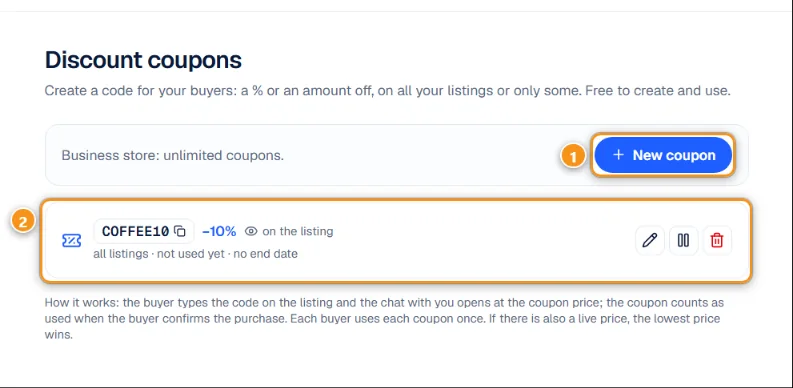
1 New coupon · 2 A coupon
Each coupon 2 shows the code, the discount, where it is valid, how many times it was used, the end date and whether it is on the listing or secret. You can Copy code, Edit, Pause, Resume or Delete it. Deleting doesn't touch deals that already used it.
A personal account can have up to 3 active coupons. A Business store has no limit.
Create a coupon
Tap New coupon 1.
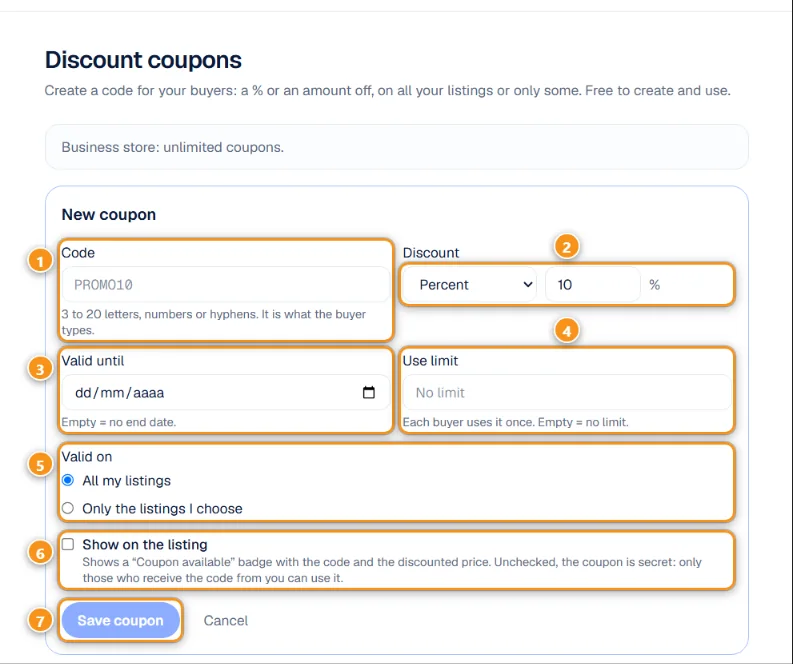
1 Code · 2 Percent or amount · 3 Valid until · 4 Use limit · 5 Valid on · 6 Show on the listing · 7 Save coupon
- Code 1: 3 to 20 letters, numbers or hyphens. It is what the buyer types.
- Discount 2: Percent (1 to 90%) or Amount (US$).
- Valid until 3: leave it empty for no end date.
- Use limit 4: how many buyers can use it in total. Empty means no limit. Each buyer uses it once.
- Valid on 5: All my listings or Only the listings I choose.
- Show on the listing 6: ticked, the listing shows a Coupon available badge with the code and the discounted price. Unticked, the coupon is secret: only those who receive the code from you can use it.
- Tap Save coupon 7.
Ideas
- A secret code for a returning buyer, sent in the chat.
- A public coupon on slow-moving items instead of lowering the price.
- A code you announce in your store's live showcase or on your social media.
Related: Trading: questions, chat and handshake · Live showcase
Updated 2026-10-17