

Deal closed, receipt and reviews
After the handshake, the buyer confirms receipt, the deal closes and both sides review each other. Reviews are double-blind and build your reputation.
Watch the lesson
A deal on Anyza ends in three moves: the buyer confirms the purchase, confirms receipt when the item is in hand, and then both sides review each other. How to get to the handshake is in Trading: questions, chat and handshake.
1. Deal confirmed: wait for the item
After the buyer taps Confirm I bought it, the chat shows the next step.
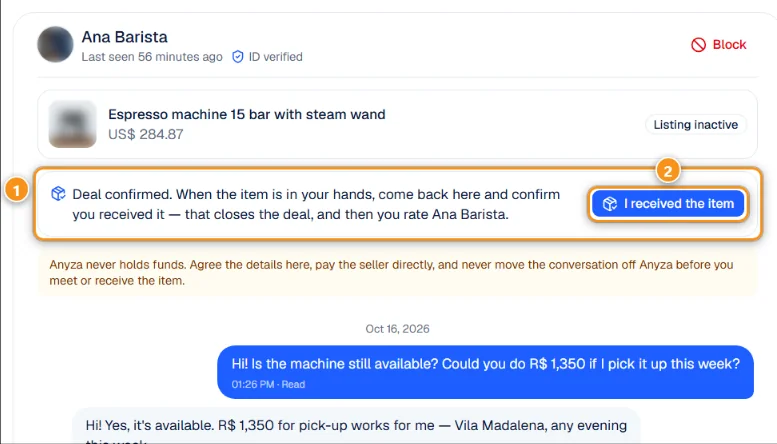
1 Deal confirmed · 2 I received the item
The message 1 reminds the buyer to come back once the item is in their hands. Pay the seller wallet to wallet as agreed; Anyza never holds the money. When you have the item (or the service was done), tap I received the item 2. That closes the negotiation and the seller is notified.
Only the buyer confirms receipt. Until then, the seller sees Waiting for <name> to confirm they received the item.
2. Deal closed
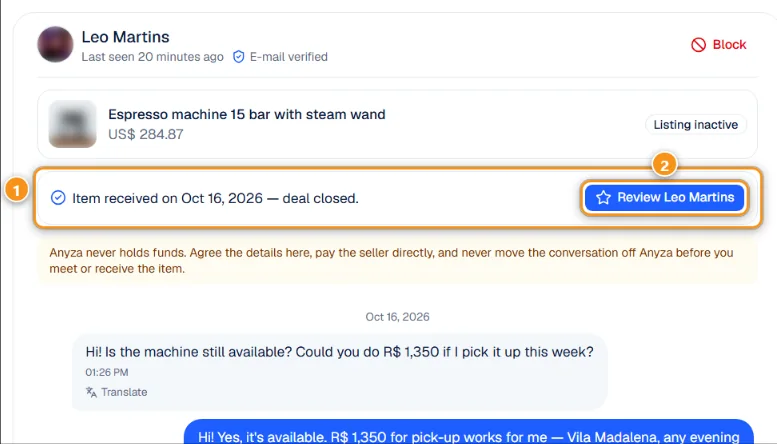
1 Item received — deal closed · 2 Review <name>
Both sides now see Item received on <date> — deal closed 1 and a button to review the other person 2. The listing page keeps a Deal history with who bought it and the buyer's review of the seller.
The deal also moves to Completed in Deals:

1 Completed · 2 The closed deal · 3 Review
Each completed deal 2 shows who bought it, the date, Confirmed and whether your review is still pending. Review 3 opens the form.
3. Review each other
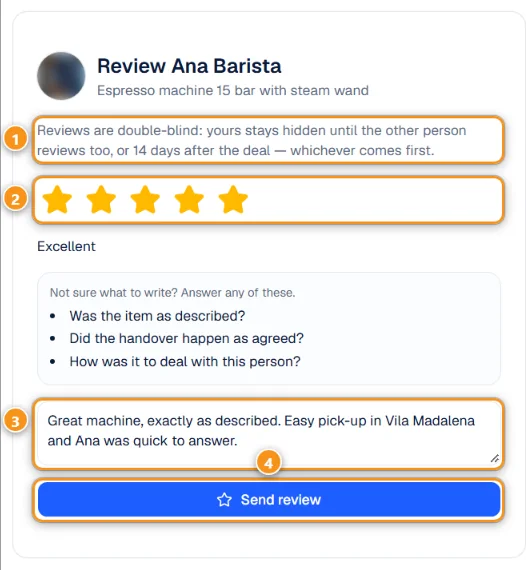
1 Double-blind · 2 Stars · 3 Comment · 4 Send review
Pick 1 to 5 stars 2 and write a comment 3. If you are not sure what to write, the form suggests questions: was the item as described, did the handover happen as agreed, how was it to deal with this person. Tap Send review 4.
- Double-blind 1: your review stays hidden until the other person reviews too, or 14 days after the deal, whichever comes first. Neither side can see the other's review before writing their own.
- You have 30 days to review.
- You can't change the stars. You can fix the text once, within 24 hours (Fix the text). If the review is already public, it shows as edited.
- Reviews only come from deals confirmed by both sides. Nobody can review you without a confirmed deal.
Where reviews show up
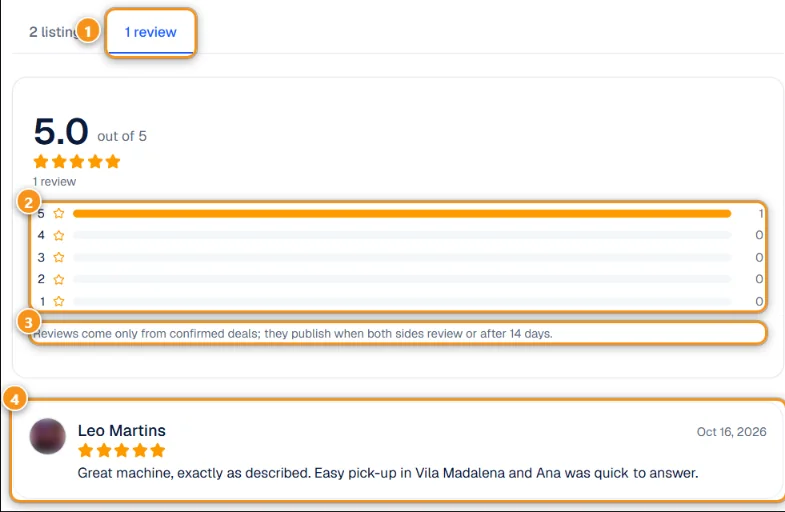
1 Reviews tab · 2 Stars breakdown · 3 Only confirmed deals count · 4 A review
On every profile and store, the Reviews tab 1 shows the average, the breakdown by stars 2 and each review 4 with the reviewer, the date and the comment. Reviews and confirmed deals also feed the Rating, Completed sales and Completed purchases at the top of the profile.
Common questions
The buyer never confirmed. What happens? After 14 days without an answer the handshake expires and the listing is available again. The seller can also Withdraw earlier in Deals.
I sold to someone who is not on Anyza. Use Sold outside Anyza in My listings. No reputation is earned, because there is no one to confirm the deal.
The buyer received the item but didn't review. The deal still counts as a completed sale. Your own review becomes public after 14 days.
Related: Before you trade: how to make a good deal · Your account and public profile
Updated 2026-10-17