

Your account and public profile
The My account page with your credits, verification and shortcuts, and the public profile or store page buyers see before they message you.
Watch the lesson
Your Anyza account is the same on Market, Club and Events. On the Market it has two faces: My account, which only you see, and your public profile (or store page), which everyone sees.
My account
Open the avatar menu and choose My account (/me).
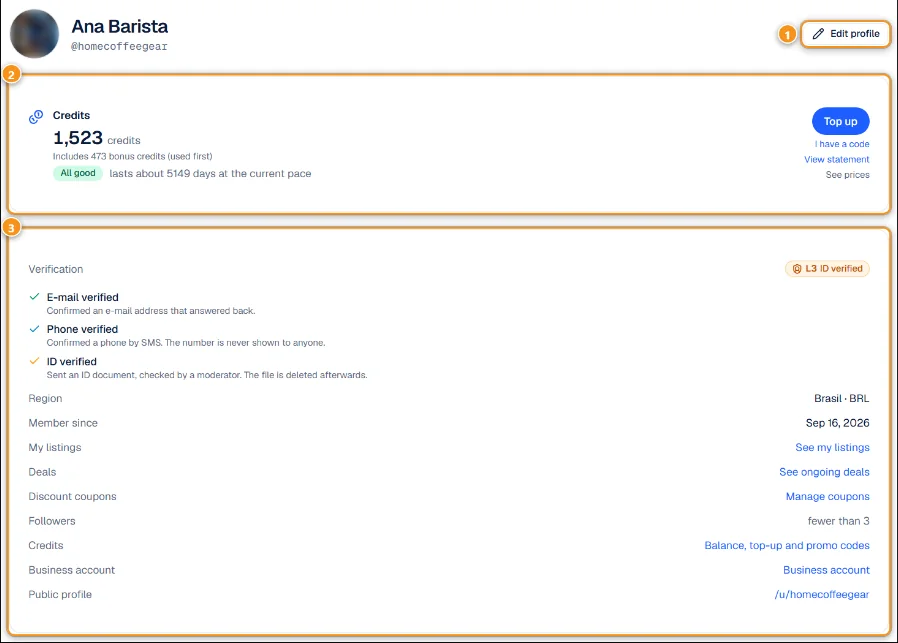
1 Edit profile · 2 Credits · 3 Verification and shortcuts
- Edit profile 1 changes your photo, display name, bio and region.
- Credits 2 shows your balance, how many are bonus credits (used first) and how long they last at your current pace. Top up, I have a code, View statement and See prices take you to Anyza Finance.
- The bottom block 3 shows your Verification level and shortcuts to My listings, Deals, Discount coupons, Credits, Business account and your Public profile. Followers shows how many people follow you (below 3 it says "fewer than 3", so nobody can guess who).
Verification levels
- L1: e-mail confirmed. Enough to publish, ask questions and message sellers.
- L2: phone confirmed by SMS. The number is never shown to anyone.
- L3: ID document checked by a moderator. The file is deleted afterwards. Required for some high-value categories and for the Business store.
Higher levels show on your profile and listings and make buyers more willing to deal with you. See Verifications and levels.
Your public profile or store
Everyone can open your profile at /u/<username>. With a Business account it becomes your store, with the store name and the Store badge.
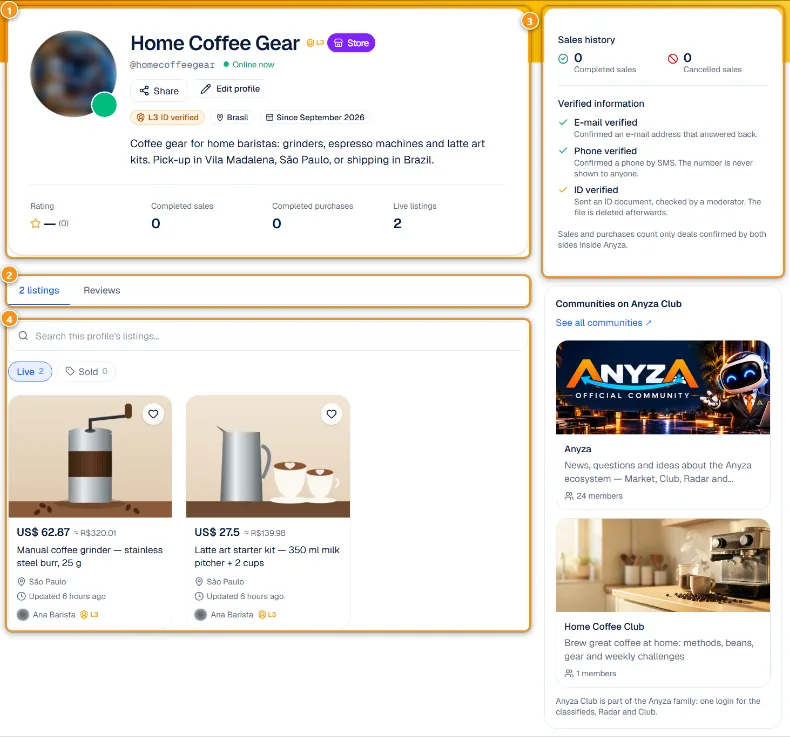
1 Name, level, bio and numbers · 2 Listings and Reviews tabs · 3 Sales history and verified information · 4 Live listings
The header 1 shows the name, the verification level, the region, how long you have been on Anyza, your bio, the Rating, Completed sales, Completed purchases and Live listings. Share copies the link; on your own profile you also see Edit profile.
The tabs 2 switch between your listings and the Reviews you received. The side box 3 repeats the sales history and lists what is verified (e-mail, phone, ID). Below the listings 4, buyers can search inside your profile and see what is live or sold. If you own communities on Anyza Club, they show on the side too.
Tips
- Add a real photo and a short bio saying what you sell and where. Profiles with a bio get more messages.
- Confirm your phone (L2). It costs nothing and buyers trust it.
- Your sales and purchases only count when the deal is confirmed by both sides. See Deal closed, receipt and reviews.
Related: What is Anyza Market · Business account and featured listings
Updated 2026-10-17