

Business account and featured listings
Turn your profile into a store with stock, a sales dashboard and live selling, and feature any listing on a calendar. Everything is paid in credits.
Watch the lesson
Two ways to sell more on Anyza Market: the Business account, which turns your profile into a store, and featured listings, which anyone can book for a live listing. Both are paid in credits. There is never a commission on sales.
Business account
What you get
- A store name and a Store badge, shown instead of your profile name across the site. Your store page is
/u/<your username>. - Stock and a size and colour grid: sell the same item many times. The listing stays up after each sale until the last unit goes.
- Featured days 40% cheaper (see the prices below).
- Store dashboard: revenue, visits, contacts, a funnel from views to deals, results per listing, featured-listing returns and low stock, with CSV export. See Store dashboard.
- Hidden and Followers only listings. Hidden listings stay out of search and off your store; people reach them only by the direct link or when you pin them in a live. Followers-only listings are visible to everyone, but only people who follow your store can negotiate.
- Unlimited discount coupons (personal accounts have up to 3 active). See Discount coupons.
- Live showcase: sell live from your store. See Live showcase.
- Your physical shop on Anyza Radar, with the Anyza store badge.
- Your Anyza Club communities shown on your store and listings.
Who can apply
You need level L3 (ID document checked by a moderator). Without it, the Business page offers Verify document.
How to apply and activate
- Open the account menu and choose Business account.
- Fill in Store name (it can't match another store), What you sell and, optionally, your Website (https only).
- Tap Send application. Applying is free.
- Most applications are approved on the spot by an automatic check. If something needs a closer look, a person reviews it, usually within a few days, and you get a notification.
- Once approved, tap Turn my store on. Activation costs 100 credits, charged each time you activate. The 1,000 welcome credits every account gets cover it.
What it costs
- Activation: 100 credits (charged again if you switch back to personal and later reactivate).
- Each live store listing: 2 credits per day (a personal listing uses 1). Paused or sold listings don't count.
- Featured days and live hours are extra.
If your balance runs out, the store keeps running for a short while on a −100 credit allowance. After that, your listings pause and come back on their own when you top up. Nothing is deleted. You get low-balance warnings about 7 days and 3 days before.
Switch back to personal
Tap Switch back to personal account in the store dashboard (or on the Business account page). Your listings stay live at 1 credit per day and active featured days end. Listings with stock or a grid keep selling what they have, but restocking needs the store. Reactivating later charges the 100 credits again.
Featured listings
Anyone can feature a live listing. Featured listings get a Featured badge and appear in the featured spots, shuffled on every visit.
How to book
- Go to My listings and tap Feature it on the listing.
- Choose where, then click the days and confirm:
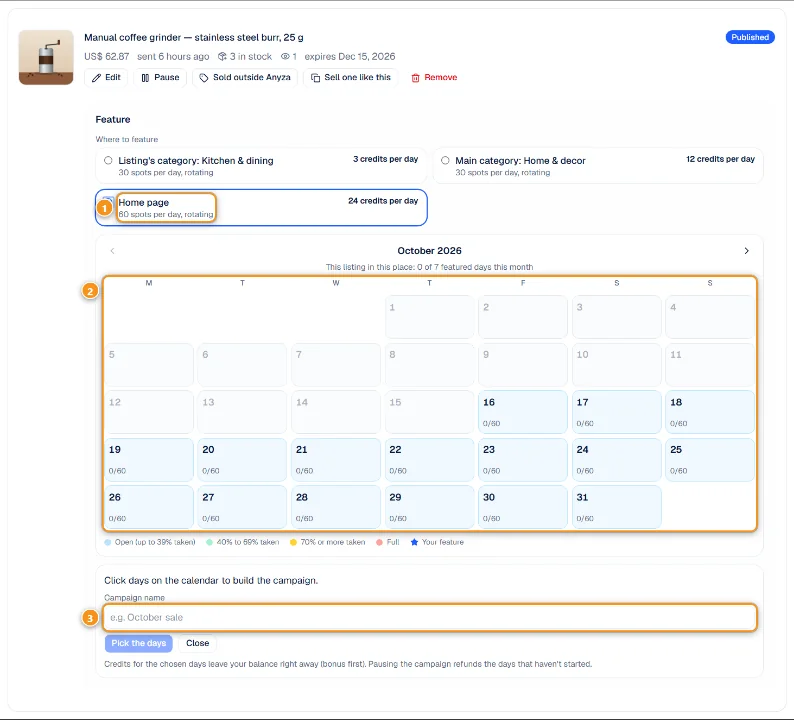
1 Where to feature · 2 Calendar · 3 Campaign name
- Where to feature 1: Listing's category, Parent category, Main category or Home page. Each option shows the price per day and how many spots it has per day.
- Calendar 2: click the days, from today up to 60 days ahead. Each day shows how many spots are taken (for example 0/60) and its colour shows how full it is: open, 40–69% taken, 70% or more, full. A full day can't be picked. The line above the calendar shows how many featured days this listing already has in this place this month.
- Campaign name 3 (optional), then Pick the days to confirm. The credits leave your balance right away, bonus credits first.
Prices per day
- Listing's category: 5 credits (3 for a Business store)
- Parent category: 10 credits (6)
- Main category: 20 credits (12)
- Home page: 40 credits (24)
Each place has a limited number of spots per day, rotating. A listing can be featured at most 7 days per month in the same place.
Pause, resume and refunds
- Pause a campaign and you get back the credits for the days that haven't started. Today counts as used.
- Resume by picking new days.
- If the listing goes offline (sold, paused, expired or removed), the feature stops and the remaining days are refunded.
- Changing the listing's category ends a feature booked in the old category: the remaining days come back as credits (today isn't refunded) and you can resume the campaign in the new category.
Business stores see how each campaign performed in Featured-listing returns on the store dashboard.
Common questions
Do I need Business to feature a listing? No. Business only makes it 40% cheaper.
Is there a monthly fee? No. You pay the activation and the daily use of your live listings, from your credit balance.
Compare both accounts side by side on the Personal or Business account? page (/business on anyza.market).
Updated 2026-10-17