

Search, filters and alerts
Search by text, category, city and distance, see listings on a map, browse city pages, and get an alert when something new matches.
Watch the lesson
You don't need an account to search. Alerts, favorites and following sellers need you signed in.
Search and filters
Type in the search bar at the top (What are you looking for?) and pick a category if you want.
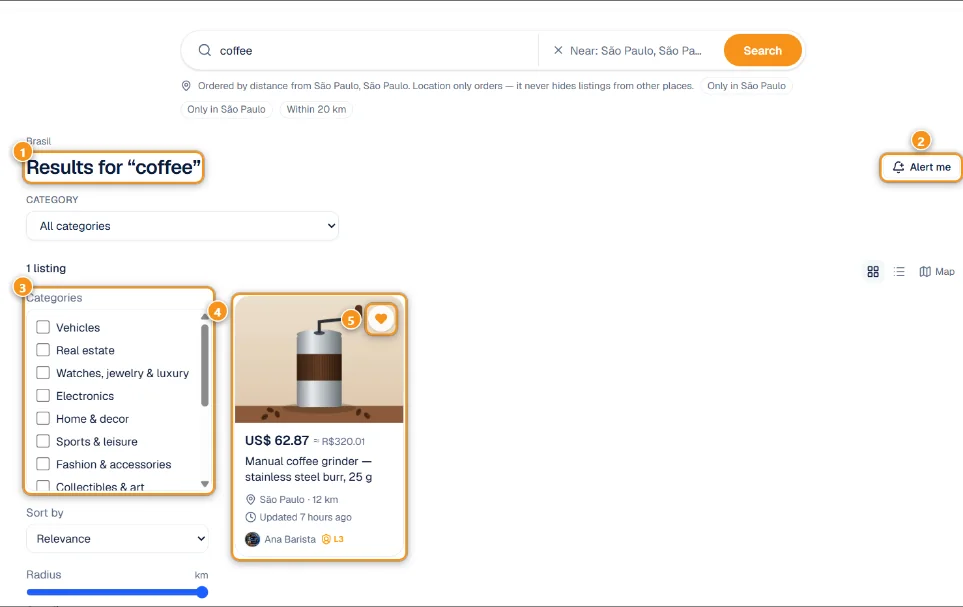
1 Your search · 2 Alert me · 3 Filters · 4 A result · 5 Save to favorites
The results page shows what you searched for 1, the number of listings and the filters on the side 3 (Filters on the phone):
- Categories, Price (US$) with minimum and maximum
- Type, Delivery and Condition
- Seller verification (e-mail, phone or ID verified) and Seller rating
- Location: state and city, and in the Global region also the Country
- Accepts trade (or open the Swap Market to search by what you have)
- Category filters (for example brand), when the category has them
Each card 4 shows the price, the city, the distance when you searched near a place, and the seller with their level. The heart 5 saves it to your favorites.
Sort by offers Newest, Relevance, Price: low to high, Price: high to low, Distance and Best-rated sellers. You can switch between gallery and list view.
Near me
Near me uses your browser location (only if you allow it) and orders results by distance. Location only orders the list: it never hides listings from other places unless you set a distance with the Radius slider (in km or miles). If the browser blocks location, filter by state and city instead.
Map
Tap Map to see the listings on a map. Drag or zoom and tap Search this area to load what is there. Each pin marks an approximate zone of about 1 km, never the address. The map shows up to the 200 closest listings; zoom in to see more. Remote listings don't appear on the map.
Places that accept crypto nearby
When your search has a location (Near me or a place), a box called Accept crypto nearby may appear next to the results. It lists up to 6 businesses within 5 km that already take bitcoin, from Anyza Radar, with their distance. These are shops on the Radar map, not Market listings. See all on Radar opens the full map.
Regions
Switch regions with the Region selector at the top. Each country region has its own address (for example br.anyza.market) and shows prices in that country's currency as a reference. anyza.market is Global and shows everything.
City pages
Each country region has a page for every city with live listings, at /city/<city> (for example br.anyza.market/city/campinas). Open one from the By city chips on the region's home page.
A city page shows:
- the listings in that city, with category chips to narrow them (All shows everything) and See all with filters to continue in the full search;
- Sell in <city>, to post a listing there;
- Other cities in the same region;
- a link to upcoming events in that city on Anyza Events, when there are any, and Anyza Club communities.
Only cities with at least one live listing have a page. The Global region has no city pages.
Alerts for a search
Set up the search the way you want and tap Alert me 2 (sign in first if asked). Give it a name in Name this alert and tap Save alert. We check every hour and notify you when a new listing matches.
- Up to 20 alerts per account.
- An alert can have only one category ticked.
My alerts
Your alerts live in My alerts (link Manage my alerts, or /me/searches).
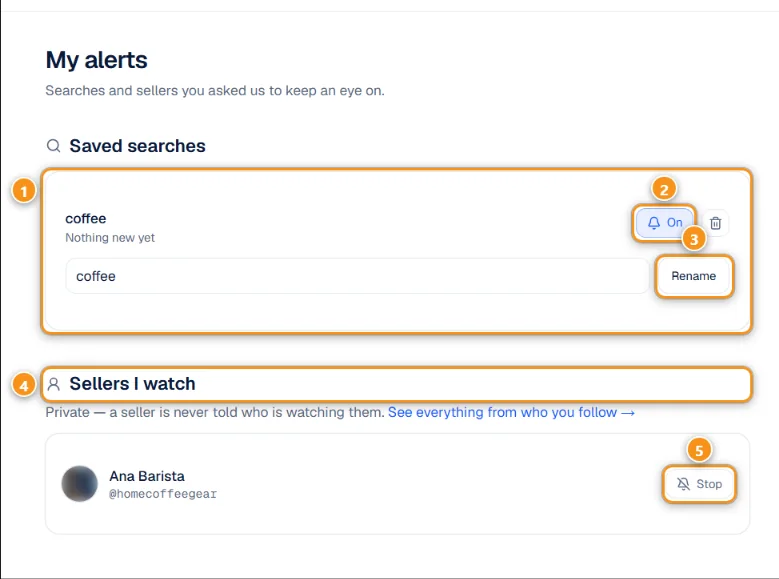
1 A saved search · 2 On / off · 3 Rename · 4 Sellers I watch · 5 Stop
Each saved search 1 shows whether something new came in. Tap On 2 to turn its alerts off or back on, type a new name and tap Rename 3, or use the bin icon to delete it.
Sellers I watch 4 lists the stores and people you follow. It is private: a seller is never told who is watching them. Stop 5 unfollows.
Alerts always arrive in the notification bell. To also get them by e-mail, check your notification and e-mail settings.
Tips
- Found nothing? Save an alert: the market is new and the listing you want may show up tomorrow.
- Use the map and Search this area to look around a neighbourhood or a city you are travelling to.
Updated 2026-10-19