

Promoters: links with a discount and commission
Turn on the promoter program, set the buyer discount, the commission and goals, bring promoters in, pay commissions and see each promoter's sales.
Watch the lesson
Promoters are people who share your event with their own link (anyza.events/e/<event>?ref=<code>). You decide what they and their friends get. Anyza never holds money: the discount comes off the price, and you pay commissions and rewards yourself.
Set up the program
Open the event's Promoters tab.
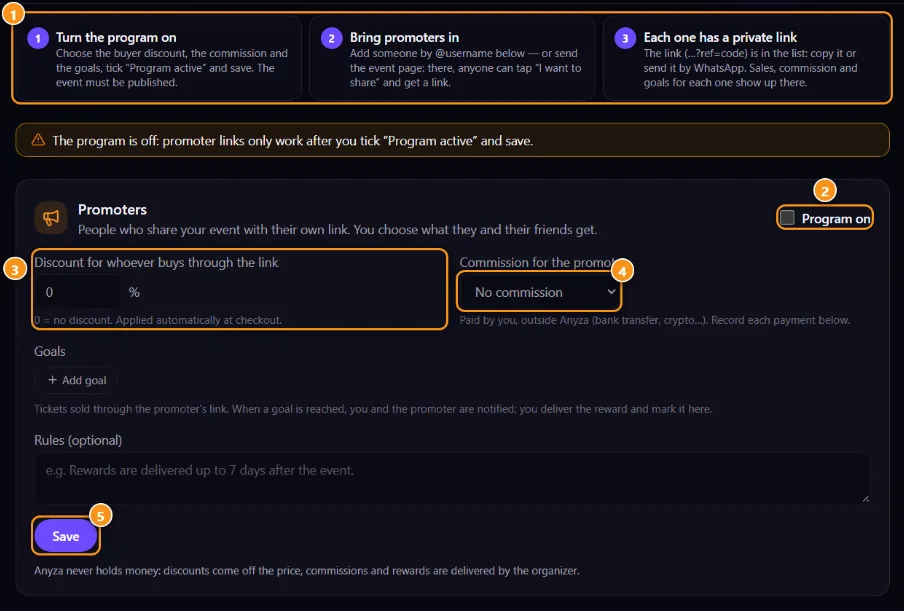
1 The three steps · 2 Program on · 3 Discount for whoever buys through the link · 4 Commission for the promoter · 5 Save
- Set the Discount for whoever buys through the link 3 (0% to 90%; 0 = no discount). It's applied at checkout.
- Choose the Commission for the promoter 4: No commission, % of the sale (up to 100%) or Fixed per ticket.
- Optional: add up to 5 Goals ("From 10 tickets → your ticket for free") and the Rules.
- Tick Program on 2 and tap Save 5.
Links only work while the program is on and the event is published. The tab warns you if either is missing.
Bring promoters in
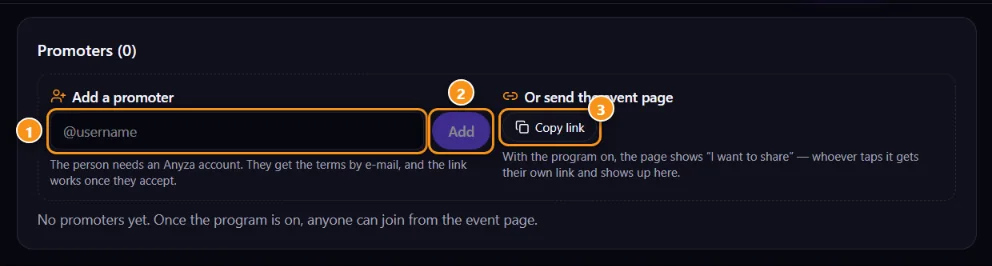
1 @username · 2 Add · 3 Or send the event page (Copy link)
- Add a promoter: type the person's
@username1 and tap Add 2. They need an Anyza account. - Or send the event page 3: with the program on, the event page shows a Share and earn box with I want to share. Whoever taps it gets their own link and shows up in your list.
Every new promoter gets the terms by e-mail, and their link only works after they accept. Until then the list shows "waiting for the terms to be accepted", and you can Resend terms (once every 10 minutes).
Follow and pay
Each promoter's line has their link (Copy link and WhatsApp), tickets, sales, commission earned, paid and to pay, and goals reached.
- Record payment when you pay outside Anyza (bank transfer, Pix, crypto).
- Pay by QR when the promoter added a Solana wallet: you send USDC or USDT straight to their wallet, converted from the event currency at today's rate. The payment is checked on the network and recorded for you.
- mark delivered when you hand over a goal reward.
- Block a promoter to stop their link.
For promoters
Tap I want to share on the event page (you need an Anyza account), accept the terms in the e-mail and add Where you receive payments (a Solana wallet, Pix key…). Only the event team sees it. Your links, tickets and earnings are in My promoter links.
People who buy through your link see "Referred by @you" in the ticket box, with the discount already applied. Your code also works in widgets: purchases through the widget count as your referral.
Related: Share and promote an event · Widgets and the countdown page · Sales and payment confirmation
Updated 2026-10-16