

Help assistant and the knowledge base
The Help button answers questions about the company using the articles of the knowledge base — only what the person asking may read — with a link to the source.
The Help button, at the bottom right of every page, opens the Anyza help assistant. Inside a company space it also answers questions about your company, using the articles of the knowledge base.
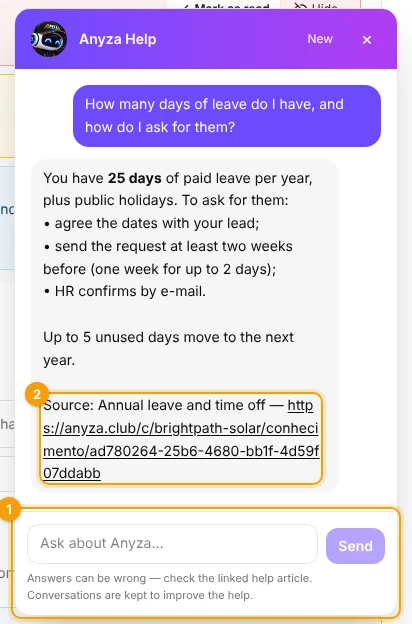
1 Ask a question · 2 The article the answer came from
How it works
- Tap Help and type the question 1 — for example "How many days of leave do I have?" or "What do I check before climbing a roof?".
- The assistant searches the knowledge base and answers in your language, with the link to the article 2 it used.
- Open the link to read the full article.
The assistant answers only with what the person asking may read: articles for the whole company, and articles of the departments the person is in. Drafts and other departments' articles are never used.
It also answers questions about how Anyza Club works (how to post a notice, invite the team, create a course…), with links to this manual.
Good articles make good answers
- Write one subject per article, with a clear title ("Annual leave and time off", not "HR info").
- Put the key facts in the text: numbers, deadlines, who to talk to.
- Set Review every on articles that get outdated, so answers stay right.
Good to know
- Answers can be wrong — check the linked article, especially for important decisions.
- Conversations are kept to improve the help.
- The first 20 questions are free; after that, 1 credit unlocks 20 more (the assistant tells you before using it). The company plan itself uses no credits.
Related: Knowledge base and departments · Anyza Help (assistant)
Updated 2026-10-19