

Member store
Let members buy and sell to each other inside your community's Store. You choose who can list, how many, whether you approve each listing, and an optional fee paid directly to you.
Watch the lesson
The Store of a community can also hold listings from members. In a community of collectors, for example, members can sell items to each other right there, with the seller's name, level and rating in view. The owner turns it on and sets the rules.
Each listing is a normal Market listing: search, chat, closing the deal and reviews all happen on the Market. The community store only shows it to members, with the seller identified.
Turn it on
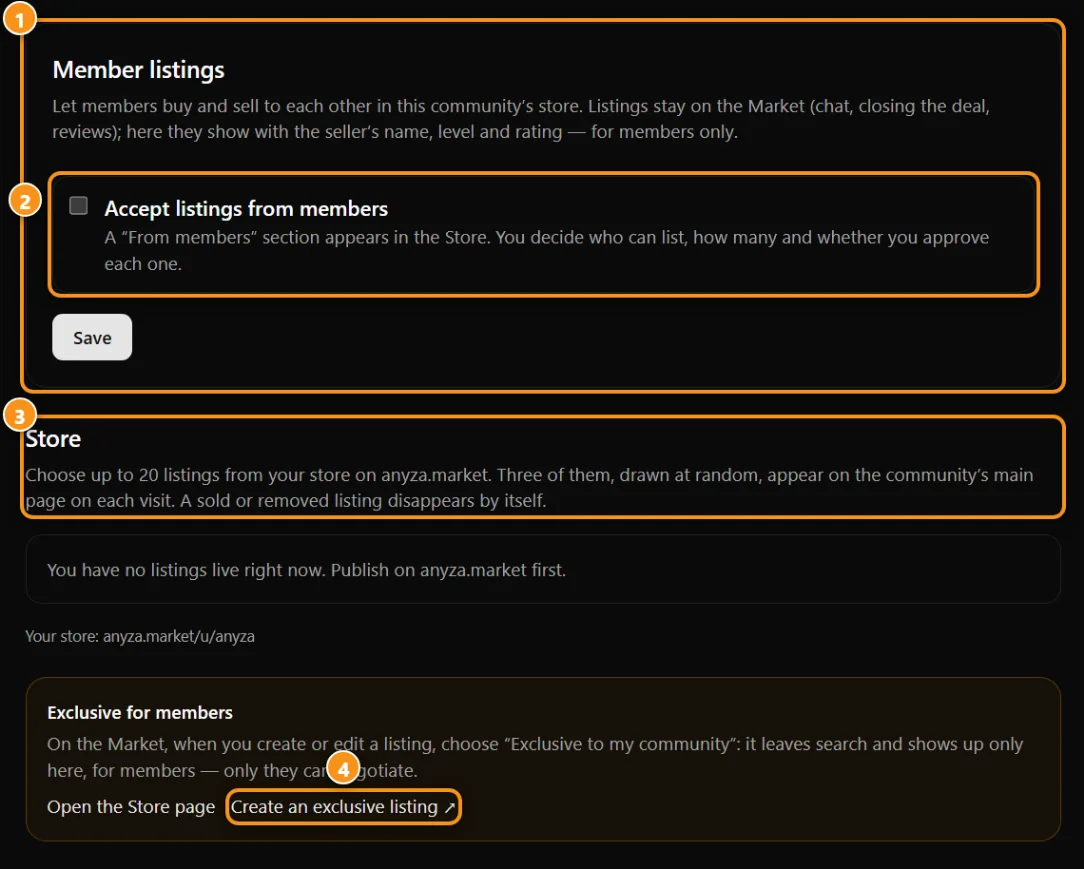
1 members’ listings · 2 accept members’ listings · 3 your own Market listings · 4 members-only listing
Go to Settings → Store → Member listings and check Accept listings from members. Only the owner and admins can change these settings. A From members section appears on the Store page, and the Store tab shows up for members even if you have no listings of your own.
Who can list
You can combine three requirements:
- Minimum level in the community.
- Minimum days since the member joined.
- Membership: any member, or subscribers from a plan you choose.
The owner, admins and moderators can always list.
Limits
- Per person: how many active listings each person can have — one number for members who don't subscribe and one for each subscription plan. Use 0 to block listing for that group.
- Whole store: the maximum number of member listings at the same time.
A listing counts toward the limit while it's waiting for approval or in the store.
Approval and moderation
Choose between:
- I approve each listing — new listings wait in Settings → Store, under Awaiting approval. You get a notification for each one.
- Listings show up right away — you can still remove any of them.
From the same list you can approve, decline or remove a listing, with an optional reason the member sees. A listing you removed can't be sent again. Next to each seller you see their level, rating and any open reports about them. Members report sellers with the flag on each card, using the same member reports you already receive.
Featured listings
- If you accept featured listings, members can pay credits to put their listing at the top of the section, for 1, 3, 7 or 14 days (3 credits per day). The store costs you nothing.
- If you don't accept featured listings, the store costs you 1 credit per active member listing per day, charged in the daily closing. This makes sense if you earn from fees and don't want paid highlights.
Your fee (optional)
You can charge members:
- a fixed amount per approved listing, or
- a percentage of each completed sale.
The fee is paid directly to you — Anyza doesn't handle this money. Write in How members pay you what they should do (for example, which wallet to send to and what to mention). Members see this text before listing.
A sale counts when the seller marks the item as sold to a buyer on the Market and the buyer confirms the purchase. At that moment the fee is recorded, and both you and the seller get a notification. In Settings → Store → Fees you see what each member owes and mark it as paid or waived. Members see their own fees on the Store page.
How members list
- On the community's Store page, under From members, tap List an item.
- Your live Market listings appear. Tap Add to store on the ones you want.
- Don't have one yet? Use Create a listing on the Market. After it's approved on the Market, come back and add it.
The Market costs of the listing stay the same. To take a listing out of the community store, tap Remove. On the Market, the listing page shows that it's in the community's member store.
Safety
Deals are between members, based on trust and the owner's moderation. Ask members to check the seller's reviews, agree on the details in the Market chat and close the deal on the Market. Escrow (payment held until both sides confirm) is planned for a later version.
Common questions
Can people outside the community see member listings? Not on the Store page — visitors see only how many there are and the invitation to join. The listing itself still exists on the Market.
Does Anyza take a cut of my fee? No. The fee goes directly from the member to you.
What happens if a member leaves the community? Their listings leave your store automatically (they stay on the Market). If they come back, the listings show up again unless you removed them.
Updated 2026-10-15